
NAS List
A NAS (Network Access Server) is a router or BNG that your subscribers connect through, for example a MikroTik, Cisco, Huawei, UBNT Access Point, Ubiquiti EdgeRouter, Nokia Routers. The NAS asks SAS Radius whether a user may connect (authentication), reports the user's traffic (accounting), and receives disconnect and speed-change requests from SAS Radius.
Every router that sends RADIUS requests to SAS Radius must be added as a NAS. Requests from an IP address that is not in the NAS list are ignored.
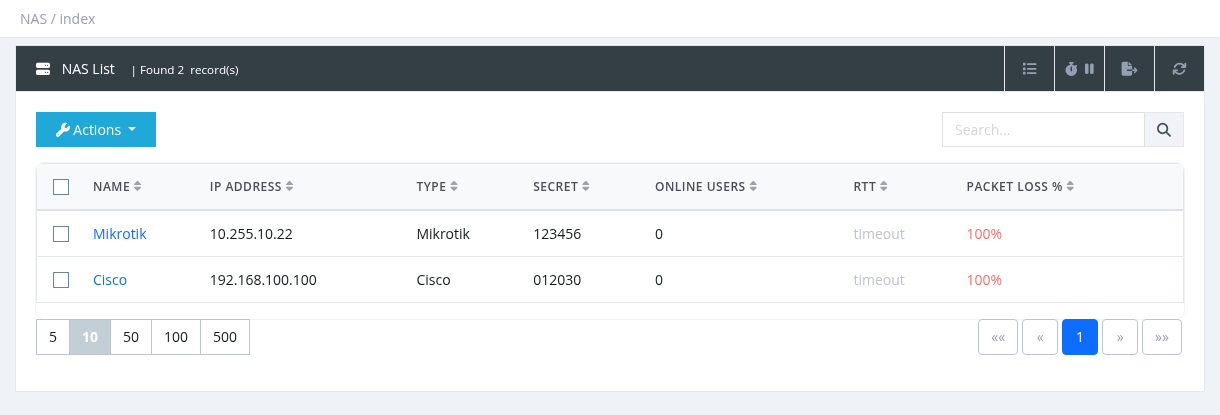
Table columns
| Column | Description |
|---|---|
| Name | The NAS name. Click it to edit the NAS. |
| IP Address | The IP address the router sends RADIUS requests from. |
| Type | The router type (Mikrotik, Cisco, Huawei…). |
| Secret | The RADIUS shared secret. |
| Online Users | Number of users connected through this NAS right now. |
| RTT | Ping response time from SAS Radius to the NAS: green = good, orange = slow (over 500 ms), grey = timeout. Shown only when Monitor (ping) is enabled on the NAS. |
| Packet Loss % | Ping packet loss: green below 25%, orange from 25%, red from 50%. Shown only when Monitor is enabled. |
- The Search box matches part of the name or IP address.
- Export creates an Excel file in the background; download it from Reports → Data Export Jobs (needs NAS - Export).
- A manager assigned to a Site sees only the NAS devices of that site.
Actions
| Action | Description |
|---|---|
| New | Add a NAS. See Adding and Editing a NAS. |
| Delete | Delete the selected NAS device(s). See below. |
To edit a NAS, click its name.
Deleting a NAS
Select one or more NAS devices, click Actions → Delete and confirm. Users who are online on that router are not disconnected, but SAS Radius no longer accepts logins or accounting from it.
Adding, editing or deleting a NAS restarts the RADIUS service. Logins and accounting stop for a few seconds, so avoid making many NAS changes at peak hours.
Required permission: NAS - Index (NAS - Delete to delete)