Addons
Addons are extra services sold on top of a package for a limited time, for example a public IP address, a gaming route or access to a special service. Create them in Profiles → addons; managers sell them with Purchase Addon in the Users List.
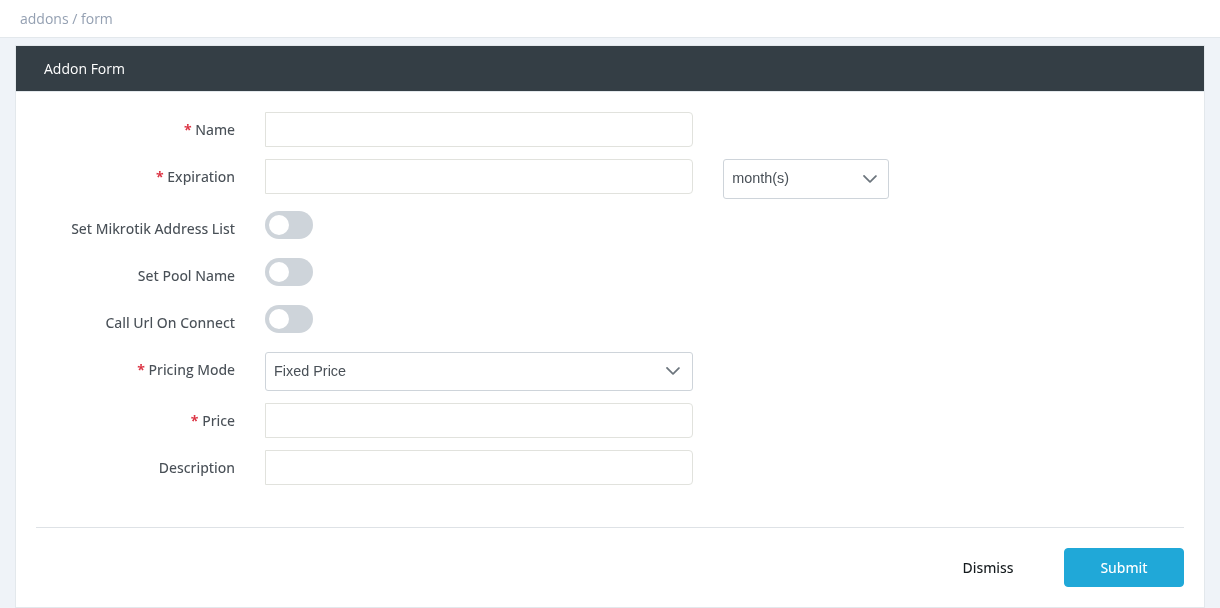
Fields
| Field | Description |
|---|---|
| Name | Addon name shown to managers. |
| Expiration | How long the addon is valid after purchase: number + day(s), month(s) or hour(s). |
| Set Mikrotik Address List / Address List Name | Adds the user to this MikroTik address list (for routing or firewall rules). |
| Set Pool Name / Pool Name | Gives the user an IP from this pool, for example a public IP pool. |
| Call Url On Connect / Url | Calls this URL when the user connects (for integrations). |
| Pricing Mode | Fixed Price, or Percentage of User's Profile Price. |
| Price | Fixed Price: the amount. Percentage: a decimal, for example 0.25 = 25% of the user's package price. |
| Description | Shown when purchasing. |
Good to know
- The price is paid from the manager's balance and goes to the admin (no commissions).
- The addon is valid from the purchase time, independent of the user's expiration. It is not refunded when cancelled.
- The addon is applied when the user reconnects.
- For the pool or address list to work, create them on the router.
See Purchase Addon in the Users chapter.
Required permission: Managers - System Administrator