# Cards Series List

The **Cards System** page lists card **series**, one row per batch. Suspended series are shown in red.

[![cards index](https://help.snono-systems.com/uploads/images/gallery/2026-11/scaled-1680-/cards-index.png)](https://help.snono-systems.com/uploads/images/gallery/2026-11/cards-index.png)

## Columns

**Series** (click to see the cards), **Type**, **Value**, **Quantity**, **Used** (cards already used), **Owner**, **Profile**, **Addon**, **Expiration**, and **Date Added** (hidden).

- The **Search** box finds a series by its number, or the series that contains a card with a matching PIN or username.
- The **Advanced Filter** filters by Owner, Type and Profile.
- Managers see their own series.

## Actions

<table id="bkmrk-actionwhat-it-doespe" style="width: 100%;"><thead><tr><th style="width: 24.5908%;">Action</th><th style="width: 47.7028%;">What it does</th><th style="width: 27.6817%;">Permission</th></tr></thead><tbody><tr><td style="width: 24.5908%;">Generate Cards / Jobs Queue</td><td style="width: 47.7028%;">See [Generating Cards](https://help.snono-systems.com/books/sas-radius/page/generating-cards).</td><td style="width: 27.6817%;">Cards - Generate Refill Cards</td></tr><tr><td style="width: 24.5908%;">Verify Card</td><td style="width: 47.7028%;">Look up one card. See below.</td><td style="width: 27.6817%;">Cards - Verify Cards</td></tr><tr><td style="width: 24.5908%;">Cards Designer</td><td style="width: 47.7028%;">See [Designing and Printing Cards](https://help.snono-systems.com/books/sas-radius/page/designing-and-printing-cards).</td><td style="width: 27.6817%;">Cards - Designer</td></tr><tr><td style="width: 24.5908%;">List</td><td style="width: 47.7028%;">Shows every card of the series: serial number, PIN, username, password, used at, used by (user and manager).</td><td style="width: 27.6817%;">Cards - List PINs</td></tr><tr><td style="width: 24.5908%;">Download (CSV)</td><td style="width: 47.7028%;">Downloads the series as an Excel file (serial, PIN, username, password, value, expiration, used).</td><td style="width: 27.6817%;">Cards - Download</td></tr><tr><td style="width: 24.5908%;">Download (PDF)</td><td style="width: 47.7028%;">Prints the cards with a design.</td><td style="width: 27.6817%;">Cards - Download</td></tr><tr><td style="width: 24.5908%;">Suspend / Release</td><td style="width: 47.7028%;">Blocks / unblocks all cards of the series, for example if cards were lost or stolen.</td><td style="width: 27.6817%;">Cards - Suspend &amp; Release</td></tr><tr><td style="width: 24.5908%;">Change Expiry</td><td style="width: 47.7028%;">Sets a new expiration date for all cards of the series.</td><td style="width: 27.6817%;">System administrator</td></tr><tr><td style="width: 24.5908%;">Change Owner / Change Owner (Range)</td><td style="width: 47.7028%;">Give cards to another manager. See [Transferring Cards and Card Reports](https://help.snono-systems.com/books/sas-radius/page/transferring-cards-and-card-reports).</td><td style="width: 27.6817%;">Cards - Change Owner / Cards - Change Owner (Range)</td></tr><tr><td style="width: 24.5908%;">Delete</td><td style="width: 47.7028%;">Permanently deletes all cards of the series, including used ones. The generation cost is not refunded.</td><td style="width: 27.6817%;">Cards - Delete</td></tr></tbody></table>

<p class="callout warning">Prefer **Suspend** over Delete for lost or unsold cards. Deleting removes the card history used by reports.</p>

## Verify Card

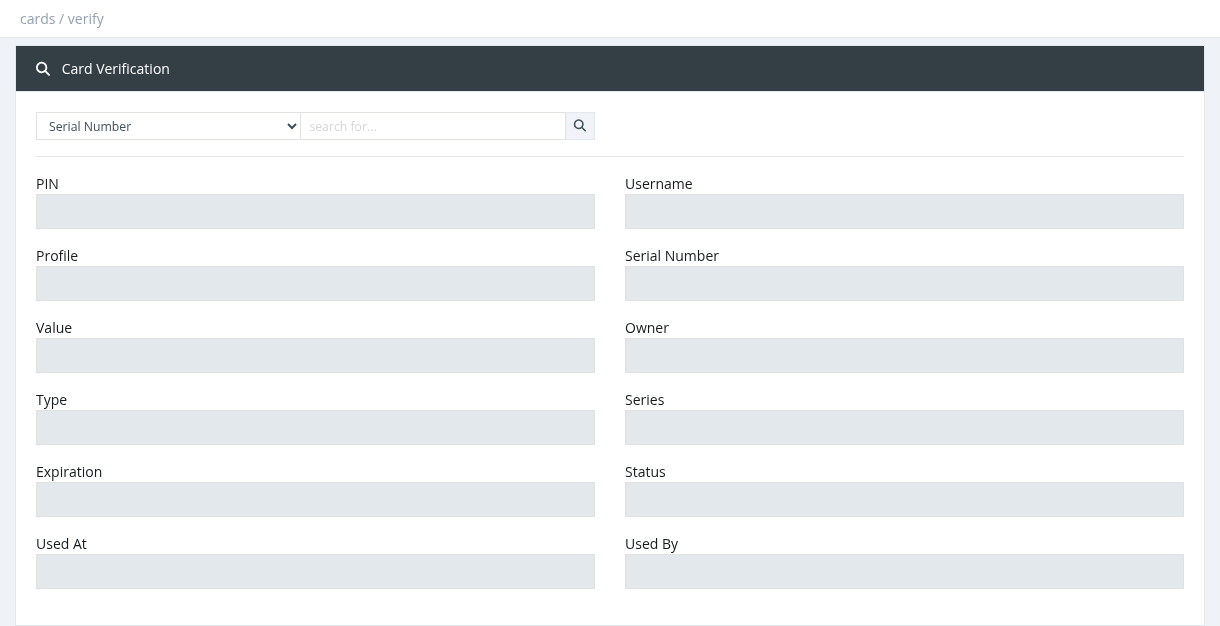
[![cards verify](https://help.snono-systems.com/uploads/images/gallery/2026-11/scaled-1680-/cards-verify.png)](https://help.snono-systems.com/uploads/images/gallery/2026-11/cards-verify.png)

Enter a serial number, PIN or username and click the search icon. The result shows the card's PIN, username, profile, serial number, value, owner, type, series, expiration, status (Unused / used), used at and used by.

*Required permission: Cards - Series Index*