SMS
Settings → sms connects SAS Radius to your SMS provider and sets the SMS texts. SAS Radius works with any provider that offers an HTTP API.
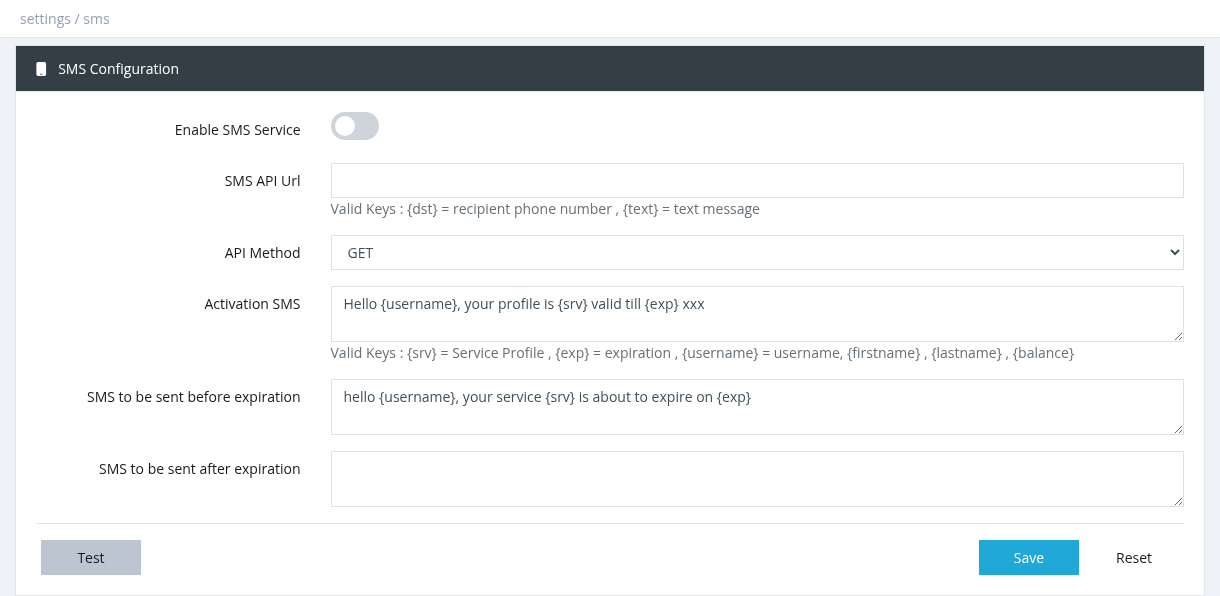
| Field | Description |
|---|---|
| Enable SMS Service | Turns SMS sending on. Required for every SMS, including activation, expiration and FUP messages. |
| SMS API Url | The address of your provider's send API. Use {dst} for the phone number and {text} for the message, for example https://sms.example.com/send?user=X&pass=Y&to={dst}&msg={text}. |
| API Method | GET or POST: the HTTP method your provider expects. Both send the SMS. |
| POST Parameters | Shown for POST. The form fields sent to the provider as name = value pairs, for example phone = {dst}, message = {text}, plus any account fields your provider needs. |
| Activation SMS | Sent after the service is activated (needs Notify via SMS on activation in Notifications). |
| SMS to be sent before expiration | Sent a few days before the subscription expires (needs Notify via SMS on expiration; the number of days is set there). |
| SMS to be sent after expiration | Sent at the moment the subscription expires. |
Placeholders
These words in the message are replaced with the subscriber's data:
| Message | Placeholders |
|---|---|
| Activation SMS | {username}, {firstname}, {lastname}, {exp} (expiration), {srv} (profile), {balance}, {id}, {parent_name}, {parent_phone}, {parent_address} |
| SMS before expiration | {username}, {firstname}, {lastname}, {exp}, {srv} |
| SMS after expiration | {username}, {firstname}, {lastname}, {exp}, {srv}, {parent_name}, {parent_phone}, {parent_address} |
Buttons
- Test: enter a mobile number to queue a test message. Success means it was queued, not delivered; check the phone.
- Reset: reloads the saved values.
Notes
- The user needs a phone number in the user form.
- SMS are sent by the SMS Service (Tools → System Services). If SMS don't go out after changing the settings, restart that service.
- Test the API URL in a browser first (with a real number and text) to make sure your provider accepts it.
Required permission: Settings - System Settings