Usage Notifications
Usage notifications warn subscribers when they have used a certain percentage of their traffic quota, for example "You have used 80% of your quota". Open Profiles → usage notifications.
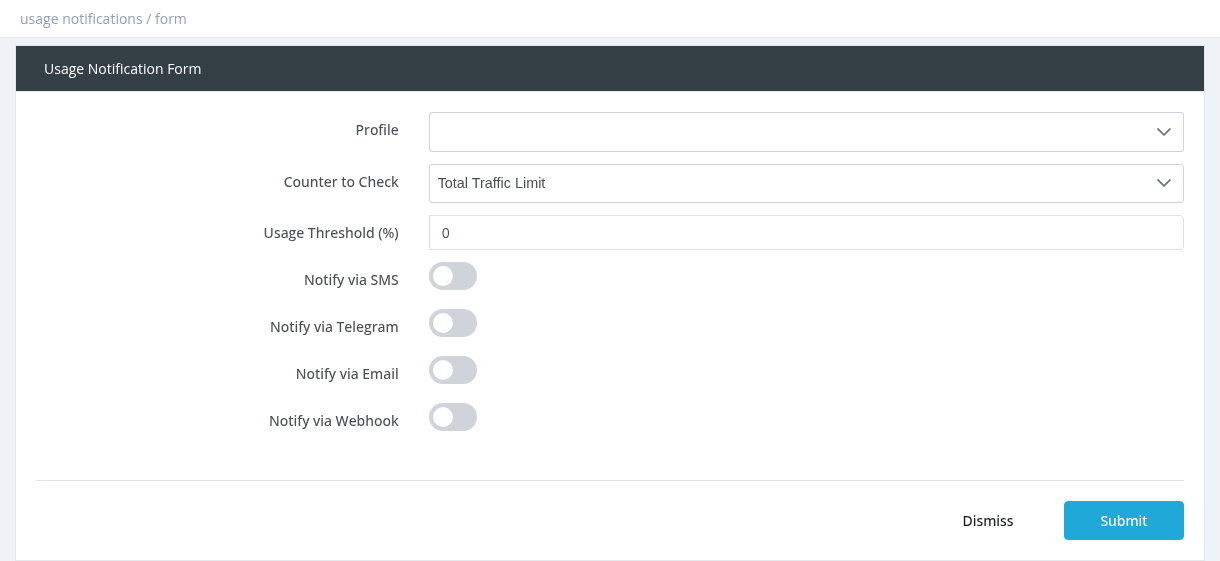
Fields
| Field | Description |
|---|---|
| Profile | The package the notification is for. |
| Counter to Check | Total Traffic Limit (the package quota) or Daily Traffic Limit. |
| Usage Threshold (%) | Send the notification when the user has used more than this percentage, for example 80. |
| Notify via SMS / SMS Message | Send this text by SMS (the user needs a phone number). |
| Notify via Telegram / Telegram Message | Send this text by Telegram (the user must have linked the Telegram bot). |
| Notify via Email / Email Template | Send an email template. Templates can use {username}, {firstname}, {lastname}, {expiration}, {profile} and {balance}. |
| Notify via Webhook / Webhook Url (GET) | Call your URL; user_id, counter and threshold are added to it. |
Good to know
- Notifications work only for profiles with a traffic limit, and are checked for online users.
- Each user receives each notification once per subscription period. It can be sent again after the next activation.
- SMS and Telegram messages are sent exactly as written (no placeholders).
- Create several notifications for one profile for several levels, for example 80% and 95%. Use Copy to duplicate one with a new threshold.
- SMS, email and Telegram must be configured in Settings.
Required permission: Managers - System Administrator