User Details Page
Click a username in the Users List to open the user's details page. It has an Overview with quick actions and several tabs with the user's history, traffic and billing. Tabs you don't have permission for are greyed out.
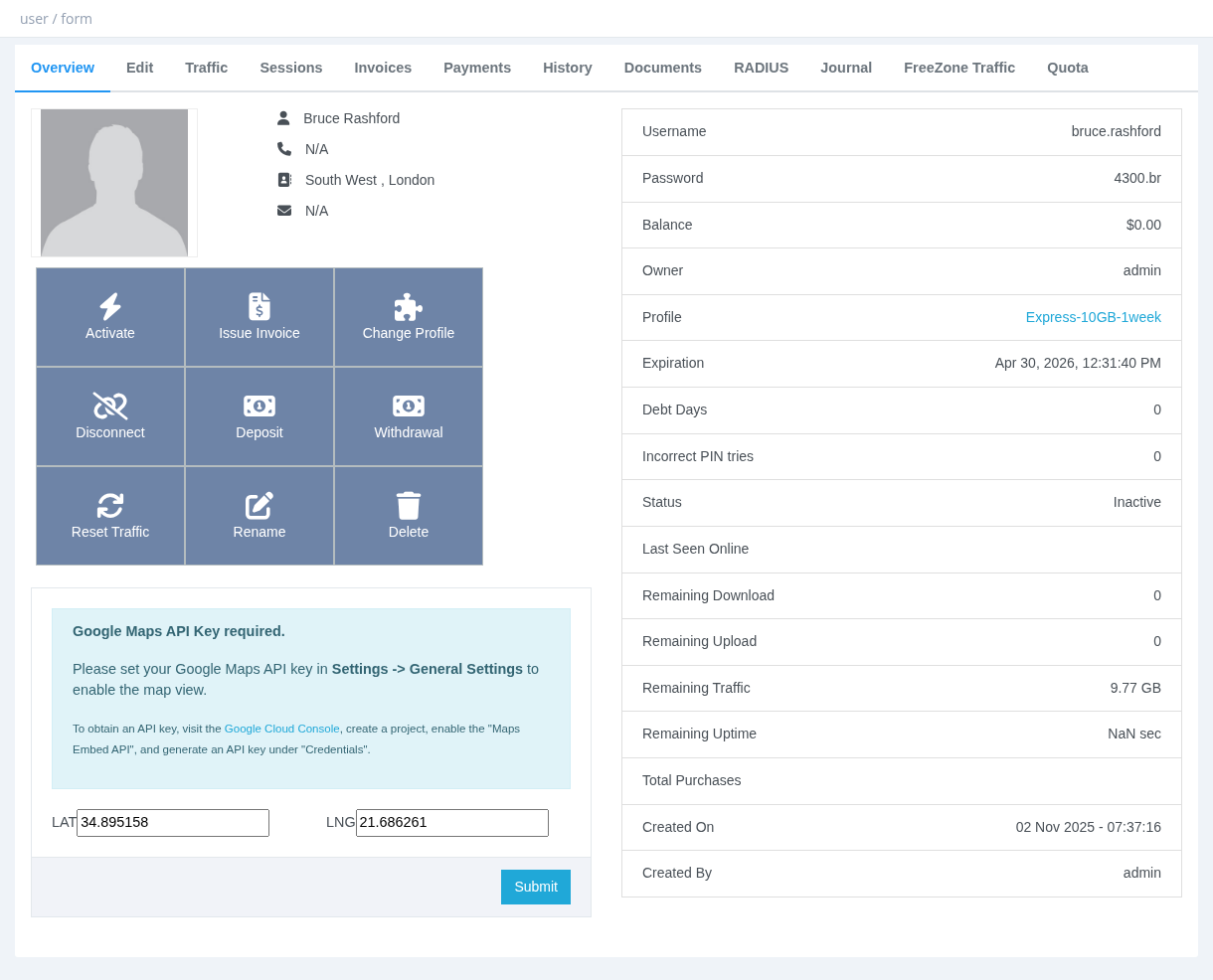
Overview
Quick action buttons
| Button | What it does |
|---|---|
| Activate | Opens Activating a User. |
| Issue Invoice | Creates an invoice for the user (needs Billing). |
| Change Profile | Opens Changing Service Profile. |
| Disconnect | Disconnects the user's current session. |
| Deposit / Withdrawal | Adds money to or takes money from the user's balance. See Deposit, Withdrawal and Pay Debt. |
| Reset Traffic | Resets today's traffic counters (daily quota) to zero. |
| Rename | See Rename User. |
| Delete | See Enable, Disable and Delete User. |
User information
| Field | Description |
|---|---|
| Password | Shown only with Users - Show Password. |
| Balance | The user's wallet balance. |
| Owner | The parent manager. |
| Profile, Expiration | Current profile and expiration date. |
| Debt Days | Service days owed from debitable extensions. |
| Incorrect PIN tries | Number of wrong card/PIN attempts. |
| Status | Active or Inactive. |
| Last Seen Online | Last time the user was connected. |
| Remaining Download / Upload / Traffic / Uptime | What is left of the quota (shown only if the profile limits it). |
| Created On / Created By | When and by whom the user was created. |
- change the user's picture (JPG/PNG, up to 2 MB);
- set the user's location on the map (needs a Google Maps API key in Settings → General Settings);
- see and cancel a scheduled profile change;
- see and cancel active addons.
Tabs
| Tab | Content | Permission |
|---|---|---|
| Edit | The user form. See Editing a User. | Users - Update |
| Traffic | Daily or monthly traffic chart and table (Download, Upload, Total, Real Traffic). Real Traffic includes free-zone traffic. | – |
| Sessions | Connection history: start/end time, IP, traffic, MAC, NAS, port, profile and termination cause. | Users - Show Sessions |
| Invoices | The user's invoices. | Users - Show Users Invoices |
| Payments | The user's receipts. | Users - Show Users Invoices |
| History | Every change made to the user, with date and manager. | Users - Show User History |
| Documents | Upload, download, rename and delete files (contracts, ID copies…). | Users - Update |
| RADIUS | Custom RADIUS attributes for this user only. | System administrator |
| Journal | The user's balance ledger (credit, debit, running balance). | Users - Show Users Journal |
| FreeZone Traffic | Traffic to free zones (not counted against the quota). | Users - Show Freezones Traffic |
| Quota | Every traffic/uptime quota added to the user (activations, added traffic, compensations) with the date it takes effect. | Users - Show User History |
Custom RADIUS attributes set on the user's RADIUS tab are meant to override the same attribute on the profile. Don't set the same attribute on both the profile and the user.