
SMS

Settings → sms connects SAS Radius to your SMS provider and sets the SMS texts. SAS Radius works with any provider that offers an HTTP API.
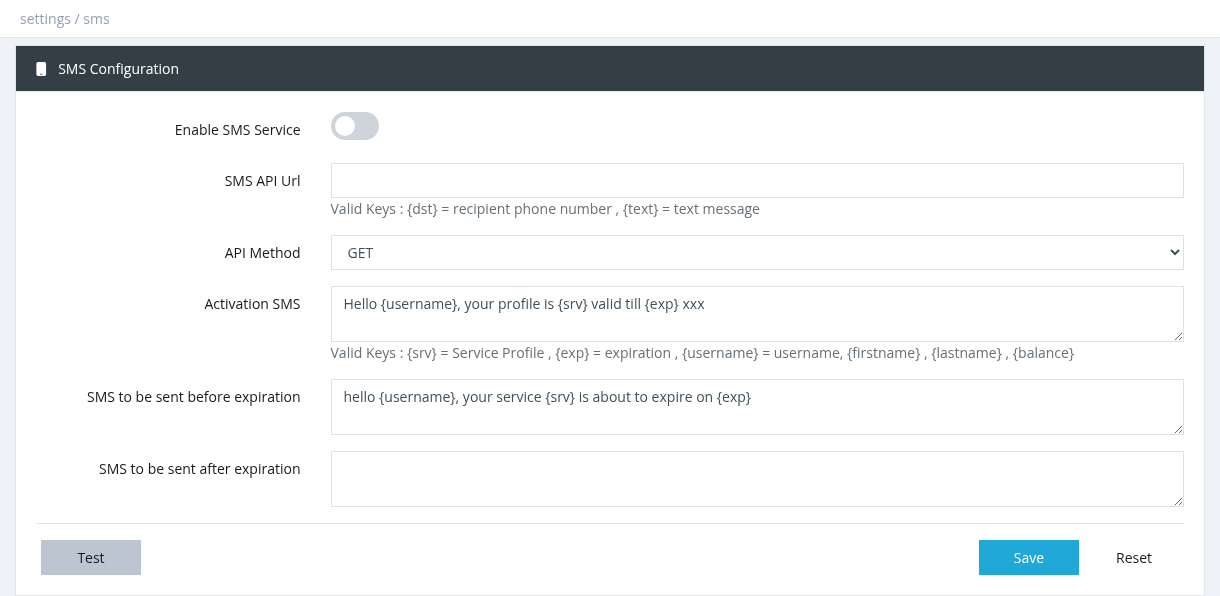
settings sms

FieldDescription Enable SMS Service

Allow to send

Turns SMS service.sending on.
Required for every SMS, including activation, expiration and FUP messages.
SMS API Url

Use this web

The address toof your provider's send SMSAPI. requests,Use and in API requests, replace placeholders like {dst} withfor the recipient's phone number and {text} withfor the textmessage, message.for
example https://sms.example.com/send?user=X&pass=Y&to={dst}&msg={text}.
API MethodGET

Inor POST: the APIHTTP Method,method youyour canprovider useexpects. "POST" toBoth send datathe andSMS.

"GET"POST toParametersShown retrievefor data.POST.
ActivationThe SMS
form

A text messagefields sent to subscribersthe containingprovider renewalas information,name including= value pairs, for example phone = {dst}, message = {text}, plus any account fields your provider needs.

Activation SMSSent after the service type,is expiration, and contact details,In the message, placeholders like {srv}activated (Serviceneeds Profile),Notify {exp}via (expiration),SMS {username},on {firstname},activation andin {lastname}Notifications). should be replaced with specific subscriber information.
SMS to be sent before expirationSent

Senda customizedfew messagesdays tobefore usersthe priorsubscription toexpires their(needs Notify via SMS on expiration; date.

the
number of days is set there).
SMS to be sent after expirationSent at the moment the subscription expires.

Placeholders

SendThese personalizedwords messagesin the message are replaced with the subscriber's data:

MessagePlaceholders Activation SMS{username}, {firstname}, {lastname}, {exp} (expiration), {srv} (profile), {balance}, {id}, {parent_name}, {parent_phone}, {parent_address} SMS before expiration{username}, {firstname}, {lastname}, {exp}, {srv} SMS after expiration{username}, {firstname}, {lastname}, {exp}, {srv}, {parent_name}, {parent_phone}, {parent_address}

Buttons

    Test: enter a mobile number to usersqueue a test message. Success means it was queued, not delivered; check the phone. Reset: reloads the saved values.

    Notes

      The user needs a phone number in the user form. SMS are sent by the SMS Service (Tools → System Services). If SMS don't go out after theirchanging expirationthe date.settings, restart that service. Test the API URL in a browser first (with a real number and text) to make sure your provider accepts it.

      Required permission: Settings - System Settings