
Creating a User
To add a subscriber, open Users → Users List, click Actions → New, fill in the form and click Submit.
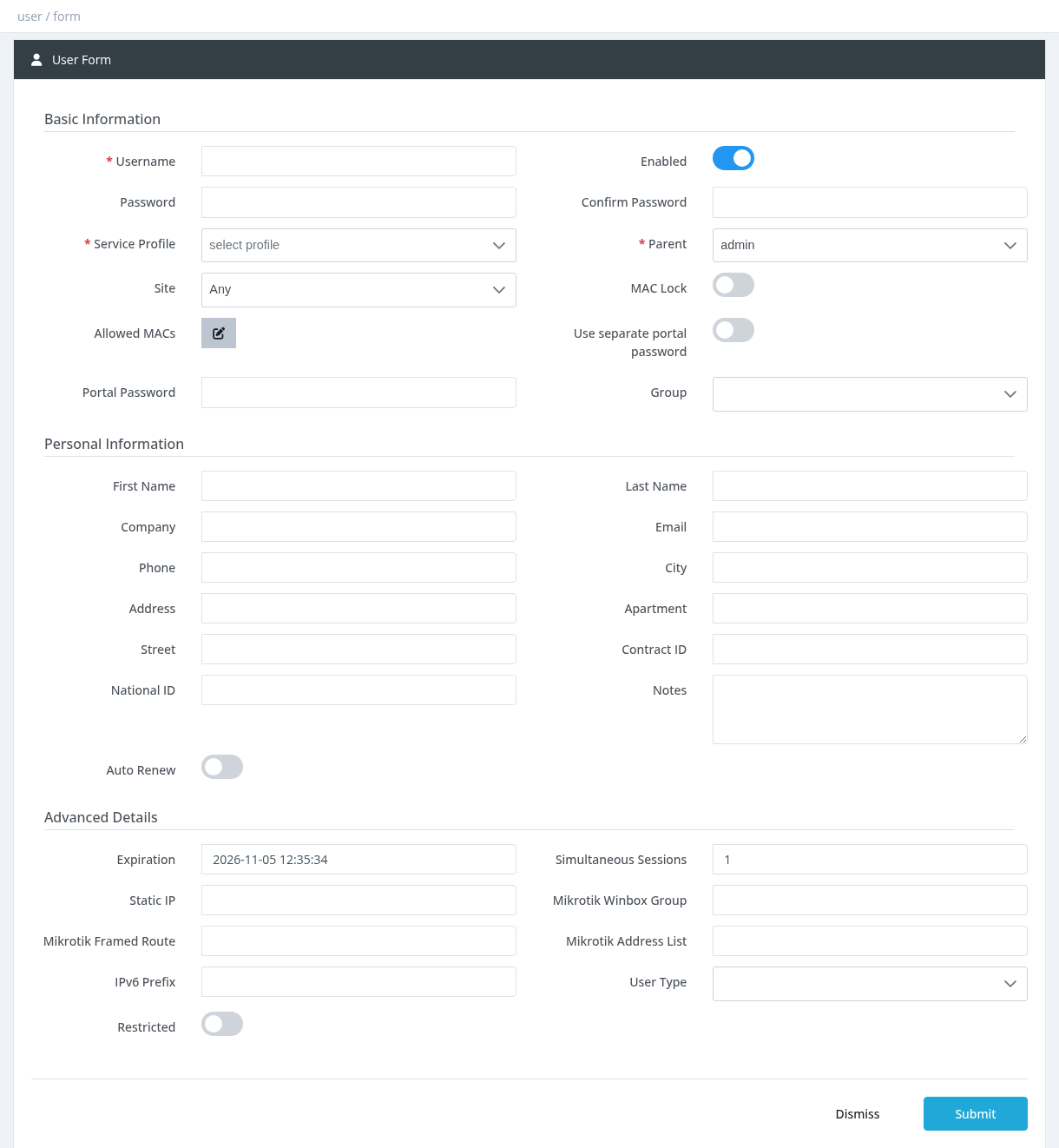
A new user has no service until it is activated. Creating a user does not charge anything. The expiration is set to the current time (unless the profile has initial values or you set an expiration in Advanced Details). After saving, use Activating a User.
Basic Information
Username
Required and unique. Allowed characters: letters, digits and . @ _ : - (no spaces). If the parent manager has a subscriber prefix or suffix, it is added automatically. The username can't be changed later in this form; use Rename User.
Enabled
ON by default. A disabled user can't connect.
Password / Confirm Password
The PPPoE / RADIUS password. It is required when creating a user. By default the same password is used for the User Portal.
Service Profile
Required. The package the user will be activated on.
Parent
The manager who owns the user. Defaults to you. Choosing another manager needs Users - Change Parent; you can only choose yourself or one of your sub-managers.
Site
The site the user belongs to. Without Settings - Sites Management, your own site is used.
MAC Lock / Allowed MACs
MAC Lock allows the user to connect only from the MAC addresses in Allowed MACs. MAC addresses (format xx:xx:xx:xx:xx:xx) can be added only after the user has been saved; each change is saved immediately.
Use separate portal password / Portal Password
Turn the switch on and enter a Portal Password to give the user a different password for the User Portal than for the internet connection.
Group
Optional. Without Groups - Assign, the user gets the parent manager's group.
Personal Information
First Name, Last Name, Company, Email, Phone, City, Address, Apartment, Street, Contract ID, National ID, Notes are optional. The phone number is used for SMS notifications and the email address for email notifications.
Auto Renew
When ON, the subscription is renewed automatically from the user's balance when it expires, if the balance is enough. Needs Users - Auto Renew.
Advanced Details
Shown only to managers with Users - Edit Advanced Fields (dangerous!).
YYYY-MM-DD hh:mm:ss).
Simultaneous SessionsHow many connections the user may have at the same time (default 1).
Static IPA fixed IP address for the user. It must not be used by another user.
Mikrotik Winbox Group, Mikrotik Framed Route, Mikrotik Address List, IPv6 PrefixMikroTik-specific values sent to the router for this user.
User TypeRegular User or Wireless Access Point.
RestrictedWhen ON, only a system administrator can edit this user.
Administrators can change or add fields to this form under Settings → Forms. Custom fields appear at the end of the form.
Common errors
Required permission: Users - Create